Spending money on batteries never feels good. Never. What feels worse, though, is the feeling of dread that builds up as a battery's usable life decays to a mere ten, maybe twenty minutes of on-time; this inevitably results in one of two outcomes: A replacement (battery or laptop) is purchased, or the system turns into a smaller version of a desktop (granted, desktops can now be built in sizes that compete with laptops).

At upwards of $100 a pop, replacing laptop batteries every year or two is often tough to justify, especially in cheaper laptops -- luckily, though, a few tricks can be employed to extend the usable life of a laptop's Lithium-Ion battery.
After our Gaming Laptop Buyer's Guide was published last week, it seemed fitting to follow-up with a post that explains how to take care of Lithium-Ion laptop batteries and make them last longer.
Charge Cycles & Depth of Charge
Lithium-Ion batteries - like those used in laptops and cell phones - are limited in their lifespan for a number of reasons, some of which are more controllable than others. Storage temperature, operating temperature, trickle charge, depth of charge, and charge cycles are just part of what determines a Li-Ion battery's life.
There's a lot of hearsay about battery extension techniques, but many of these are myths embedded in the prevalence of now-obsolete Nickel-Cadmium batteries (which have since been replaced by Li-Ion and Li-Po batteries). Nickel-Cadmium batteries were known for their memory retention, but unlike the old models, modern batteries no longer have memory retention and will not "forget" what their full charge capacity is.
With that said, certain laptop manufacturers have suggested that discharging laptops fully at regular intervals is "good" for the battery life of the laptop. Chemically speaking, this is mostly wrong, but has some merit on a software/firmware level: The battery itself will not directly benefit from a 100% discharge/recharge cycle (the opposite, in fact), the calibration system, however - which serves as the battery's life meter - will more accurately predict remaining battery life as a result. This will not increase the life of the battery, but will allow you (as a user) to have a better gauge of the remaining on-time.
All Li-Ion batteries have a limited number of charge cycles and will decay with each progressive cycle; several laptop and battery manufacturers have indicated that their batteries will permit anywhere from 300-500 full discharge/recharge cycles before the battery reaches the end of its usable life. The depth of a discharge (DoD) will largely impact the decay of a battery's life, though, and smaller discharges are less abusive to a batter than large, 100% discharges.
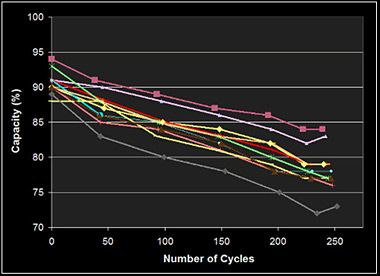 Cadex Electronics conducted research to determine remaining capacity after 250 charge cycles; the average remaining capacity was 73%-84%.
BatteryUniversity - a website dedicated to enterprise and consumer battery discussion topics - has conducted several in-depth tests concerning Li-Ion batteries (the ones referenced herein can be found in this study); one such test was of the depth of discharge of batteries and the impact on the longevity of the battery's life.
The linked test reached the conclusion that "a partial discharge reduces stress and prolongs battery life. Elevated temperature and high currents also affect cycle life." You can view their chart here:
Depth of discharge | Discharge cycles | Table 2: Cycle life as a function of A partial discharge reduces stress and prolongs battery life. Elevated temperature and high currents also affect cycle life. |
100% DoD 50% DoD 25% DoD 10% DoD | 300 – 500 1,200 – 1,500 2,000 – 2,500 3,750 – 4,700 |
It is worth mention that any references to a "0%" discharge are based off OS readings and battery life meters, not off of the actual state-of-charge of the battery; a true "0%" charge could be hazardous and result in a fire, and as such, smart batteries (making use of Battery Management Systems) will artificially pad the reading that users see. In actuality, a battery may still have 20% of its life left when it reads out as 0%, but draining a battery below 2.5V is dangerous, and so they often don't permit it in consumer-grade environments.
A slow trickle-charge to a battery already at maximum capacity can also harm its total lifespan, though, and so leaving a system constantly plugged in is inadvisable; the increased heat produced by the charging unit will damage the battery, as will unnecessary charging. Some laptops will intelligently disable charging once the battery has reached full capacity and will only resume charging once drained to a predefined level.
Battery Management Systems and Health Gauges
Rechargeable Li-Ion batteries often feature Battery Management Systems (BMS), which will help regulate the health of a battery and keep it safe. As Li-Ion batteries are highly-volatile and prone to fires when under- or over-charged, the development of BMS and other intelligent microprocessing chips prevent unstable states of charge.
A BMS will keep the battery within the realm of safe operation, attempting to prevent over-voltage, over-charge, excessive heat or cold damage, or other detrimental states. That's not an excuse to treat a battery poorly, though.
Get the most out of your battery: How To Prolong Battery Life
It may seem that everything is bad for Lithium-Ion batteries - which is, sadly, partially true - but there are things that are less bad than others when taking longevity into account. The phrase "extend your battery life" isn't necessarily the best, as the battery will always have an inevitable point-of-failure and very little can be done on that front, but it's still good practice to attempt to get the most out of a battery. The fact is that all of these tips are more on the preventative front, for while it's hard to truly extend a battery's life beyond MTBF, it is very possible to significantly decrease a battery's usable life.
- When storing batteries for long periods of time without use, unplug the device and leave the battery with a 40-70% charge. Store the battery in a cool and dry environment - like the coolest part of the house. Don't leave the device plugged in for weeks or months on end without use - this will destroy the battery's ability to retain a charge. If the battery's natural discharge depletes it below usable levels (i.e. below 2.5V), its smart system will disable the battery's ability to retain a charge, as charging it from a true-0 state could result in a fire. This is also true for overuse and abuse of a battery.
- Don't fully discharge the laptop too often. Try to keep it within the 20%-80% range of life. Opt for small depth of charge when possible; 10% charges are less abusive to the battery than, for example, full 100% charges. This is for numerous reasons, one of which is the heat produced by longer charge sessions.
- Keep the laptop away from adiabatic walls -- any surface which completely restricts heat exhaust or cooling intake will damage a mobile device in multiple ways, one of which is the battery's life. As stated in this study, "heat shortens battery life by a factor of two for every 10°C increase above 25–30°C (18°F above 77–86°F)." The internal components of mobile devices will get hot enough without your assistance. Do your best to keep them on surfaces that allow airflow.
- Your battery will not retain a memory. It will not "forget" that it can charge a full 100%; with that said, keeping your battery's gauges calibrated will help you understand when your battery will die. It's very difficulty to predict a battery's remaining life when in use, so to achieve best results, it is advisable to perform a complete charge/discharge cycle once every few months. This will help the battery's read-out to be more accurate.
- More abusive sessions of use will be more damaging to the battery's prolonged usability; keep this in mind when gaming intensively on mobile batteries or otherwise rapidly depleting them.
Have any questions about your batteries or myths you've heard? Ask away and we'll get them answered.
- Steve "Lelldorianx" Burke.