It's easy to get caught-up in the over-promotion of each generation's flagship hardware; as CPUs, chipsets, and GPUs iterate, there's a very predictable pattern of what will become the newest object of infatuation. To industry outsiders and novice/intermediate system builders, the i5-2500k might have seemed required for gaming rigs, given the amount of coverage and recommendations it received. The same goes for the previous Z68 chipset and current Z77 chipset, and on the AMD side, we see the 990FX recommended in far too many builds. These are undoubtedly powerful options with great life in them yet, and for enthusiasts, almost necessary. But for gaming? That's debatable.
This article will cover the differences between Intel and AMD chipsets (Z77, Z75, H77, etc), their naming conventions, and chipset functionality. Hopefully this information will aid in your decision of whether or not the premiere products are necessary.
The goal here is to provide enough knowledge and insight so that you can apply these points to future purchases. This generation's hardware won't be around forever, so I've specifically written the article to include analytical methods that will help you ascertain benefits of each new gen.
Let's start at the top: What chipsets do.
What is a Chipset, Anyway? Why should I care?
This is a topic we've covered in length before, but I'll provide a quick recap (though I highly encourage you to read the previous chipset analysis). In the linked article, we interviewed computer scientist Jim Vincent, who explained chipsets excellently:
"The chipset is like a spinal cord that controls most of the devices responsible for communicating with the outside world; the CPU can be thought of as a disembodied brain -- it needs the chipset to be fully functional. All of the CPU's I/O goes through channels to the chipset, which then relays or receives information from other vital organs -- video cards, peripherals, disk drives, audio, USB, and so on."
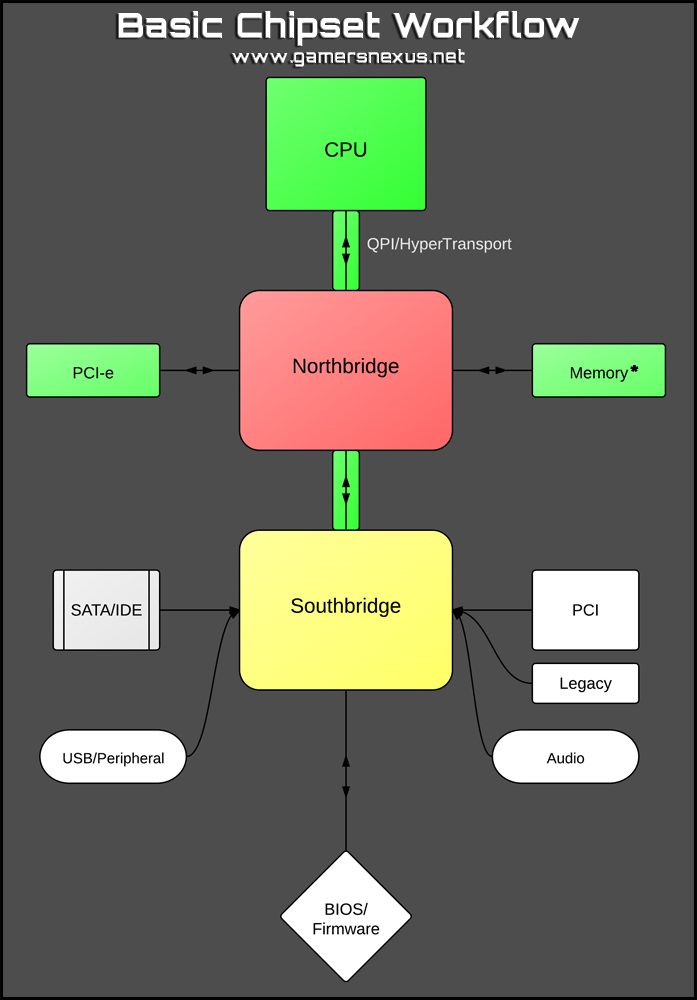
Although modern chipsets have varied takes on the traditional northbridge (high-speed IO) and southbridge (less prioritized IO) controllers on a motherboard, the functionality hasn't changed much. Intel, for instance, in recent years has implemented their PCH (Platform Controller Hub) that takes place of the NB/SB, and has discussed potentially integrating those with the CPU itself; AMD's 990FX chipset still relies on the more standard NB/SB layout. There are advantages and disadvantages of each, but they are obscured under layers upon layers of programming methodologies and more complex mathematics than system builders will often care for.
At the end of the day, the PCH or NB/SB will control your input/output operations and interconnected devices. The "chipset" itself is the composition of all of the integrated controllers, buses/lanes, and the CPU, which might look something like this:
Intel Chipsets: What types of limitations exist inter-platform and cross-platform?
As far as most users are concerned, inter-generational differences (Z77 v. Z75, for instance) between multifarious chipset and microprocessing sub-architectures are often demarcated by available options and tweaking functionality: Overclocking ceilings, advanced UEFI BIOS switches, PCI-e lane distribution (multi-GPU compatibility), memory speeds, TDP, the works. When leaving the current platform and looking to previous or incoming architectures, there may even be CPU compatibility differences; X58 vs. Z77, for an easy example, are entirely incompatible due to differing socket types and pin-outs.
The best way to delve into tangible differences is to explain Intel and AMD's respective philosophies when branding new chipsets. Intel easily has one of the most initially offsetting branding schemes, so let's first explore the top-down formation of Intel's products, then move to AMD.
Because overclocking will be a major topic in the following chipset break-down, I'd like to note that our Overclocking Primer does a fantastic job of explaining when and why you should overclock.
Intel Chipset Lettering/Numbering Naming Scheme Explanation
While browsing for a motherboard, you might encounter these current-gen chipsets: H77, Z77, Z75, or X79. This graphic explains things succinctly:
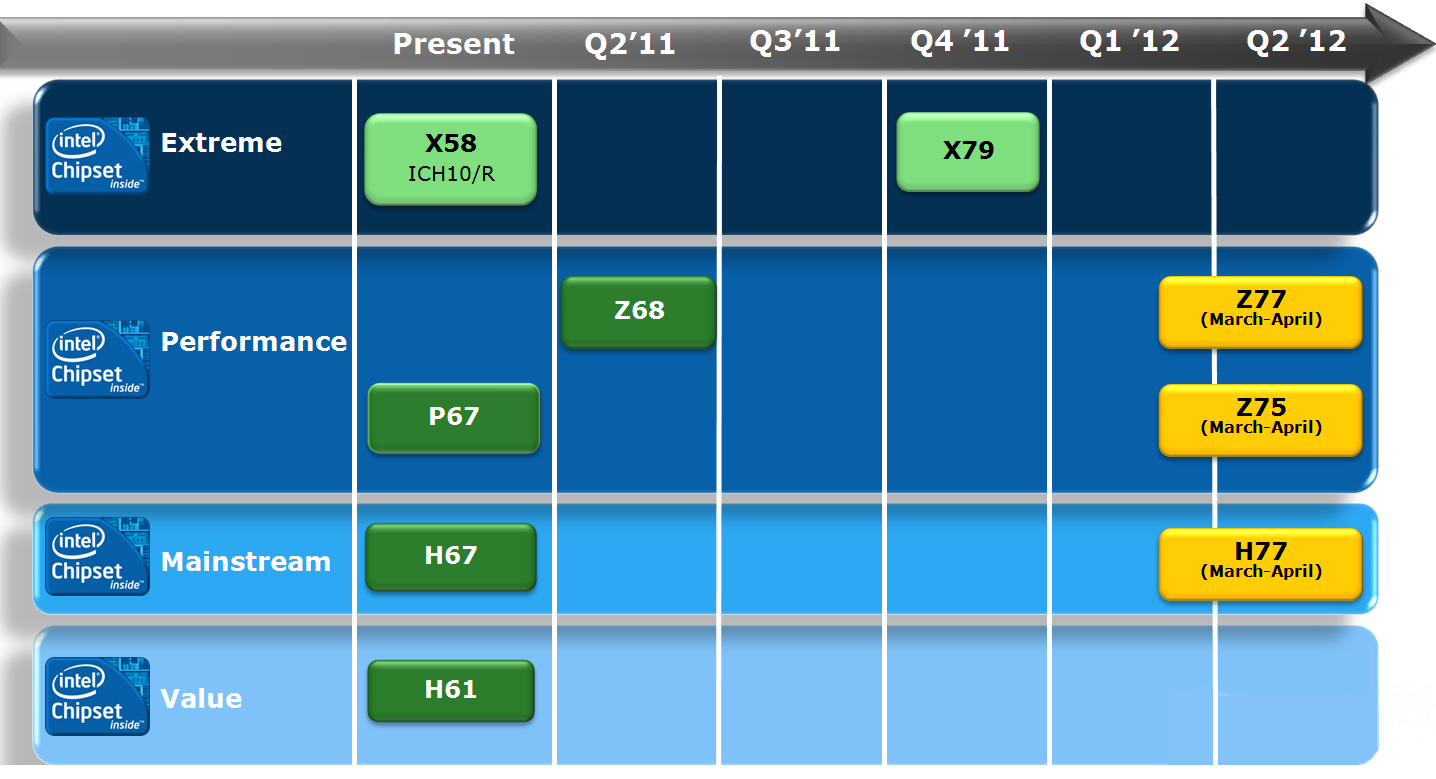 The previous Intel roadmap shows their branding terminology.
Intel has four lines of chipsets: Extreme series (X), Performance series (formerly the "P" prefix, currently "Z"), Mainstream series (H), and Value series (also H, though different numbering - like H61). The numbers (79, 77, 75, 67, 61, etc.) are the generation of the architecture. So:
(Brand) (Numeric indicator of generation).
Intel Chipset Differences & Comparison - Z77, Z75, H77
Now we get into what was promised -- tangible differences. I'll break these down on a per-chipset basis and, for comparability purposes, will stick to the current 3rd Generation chipsets. It makes the most sense to do this in table format, here's an Intel chipset comparison:
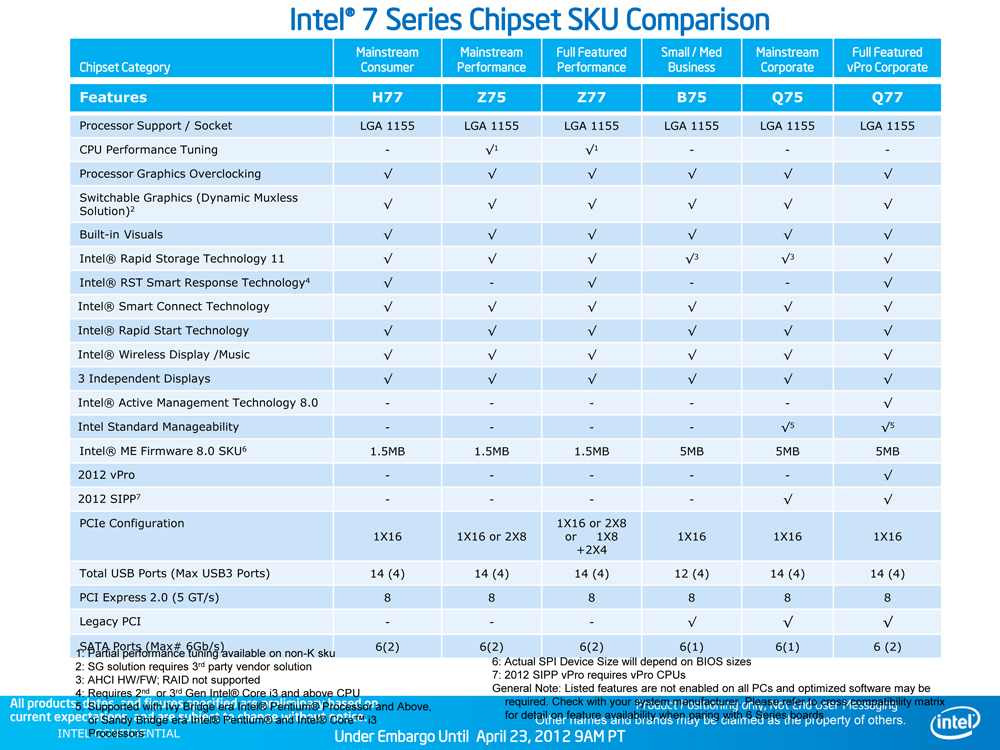
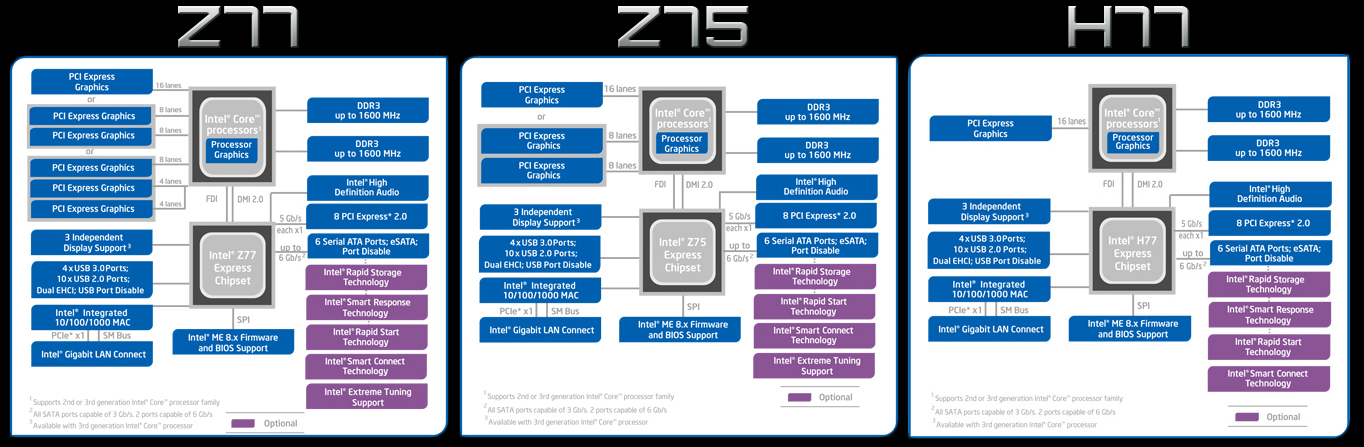
Z77: The Z77 is the popular Z68's immediate descendent. Major features include: Intel SRT & SSD caching, PCI-e lane availability for x8/x8 GPU configurations, overclocking support for CPU, RAM, and GPU. The advantages of selecting a Z77 chip are primarily for advanced overclocking, SLI/CrossFire compatibility, and SSD caching; if you're not planning to use any of those features, it may be entirely unnecessary to purchase a Z77-equipped motherboard. That said, it will certainly give you more future options should you plan to play around with them. The Z77 can also support GPUs in x8/x4/x4 mode, allowing for up to three GPUs.
Z75: The Z75 is interesting. Intel classifies it as an "entry-level" performance chipset, allowing for CPU, RAM, and GPU overclocking, and the same performance tuning as in the Z77, but lacking SSD caching / SRT. The Z75 also lacks the Z77's support for 3xSLI/CrossFire and is limited to a single card in x16 or dual cards in x8/x8 configuration. These features make the Z75 perfect for most gamers, while the disabled functionality (the options lost from the Z77) do not necessarily make it noticeably "worse" than the Z77. Enthusiasts will want the Z77 or X-series chips for a number of reasons, though. However, if you're just trying to build a gaming rig and don't need 3-way SLI or SSD caching, but still want overclocking and 2-way SLI potential, the Z75 is the way to go.
H77: Here's where a lot of the features get cut out to make a more budget-friendly chip. Intel's "Mainstream" H-series chipset is, as the name might suggest, limited to more plug-n-play uses. H77 lacks CPU and RAM overclocking and only allows for one x16 card, though it still has SRT. For those who don't care for overclocking or multi-GPU arrays and don't plan to use them in the future, the H77 makes a great choice. This particular chipset is what I'd recommend in most HTPC builds and low-end gaming machines (using locked CPUs).
The Extreme Series line of CPUs are what we'd call "Enthusiast-grade" here on GN; these chips are undeniable overkill for the majority of consumer applications, but professionals in the technology or entertainment industries can make use of the added cores and amped-up clock speeds. Intel's i7-3960X is an example of their current enthusiast grade products. The Extreme Series chipset is not covered with the above due to vast architectural differences (it is a non-linear comparison). To give you a quick idea of just how different it is, the current X79 enthusiast-grade chipset has quad-channel memory support, 40 PCI-e lanes (which can be spliced into: x16/x16; x16/x16/x8; x16/x8/x8/x8; x16/x8/x8/x4/x4) for maximum SLI functionality, and supports the additional cores on LGA2011 processors.
AMD Chipsets: What types of limitations exist inter-platform and cross-platform?
Time to move to AMD's chipsets -- again, there are vast differences in architecture even within the same brand, so linear comparisons between Intel and AMD cannot be drawn simply.
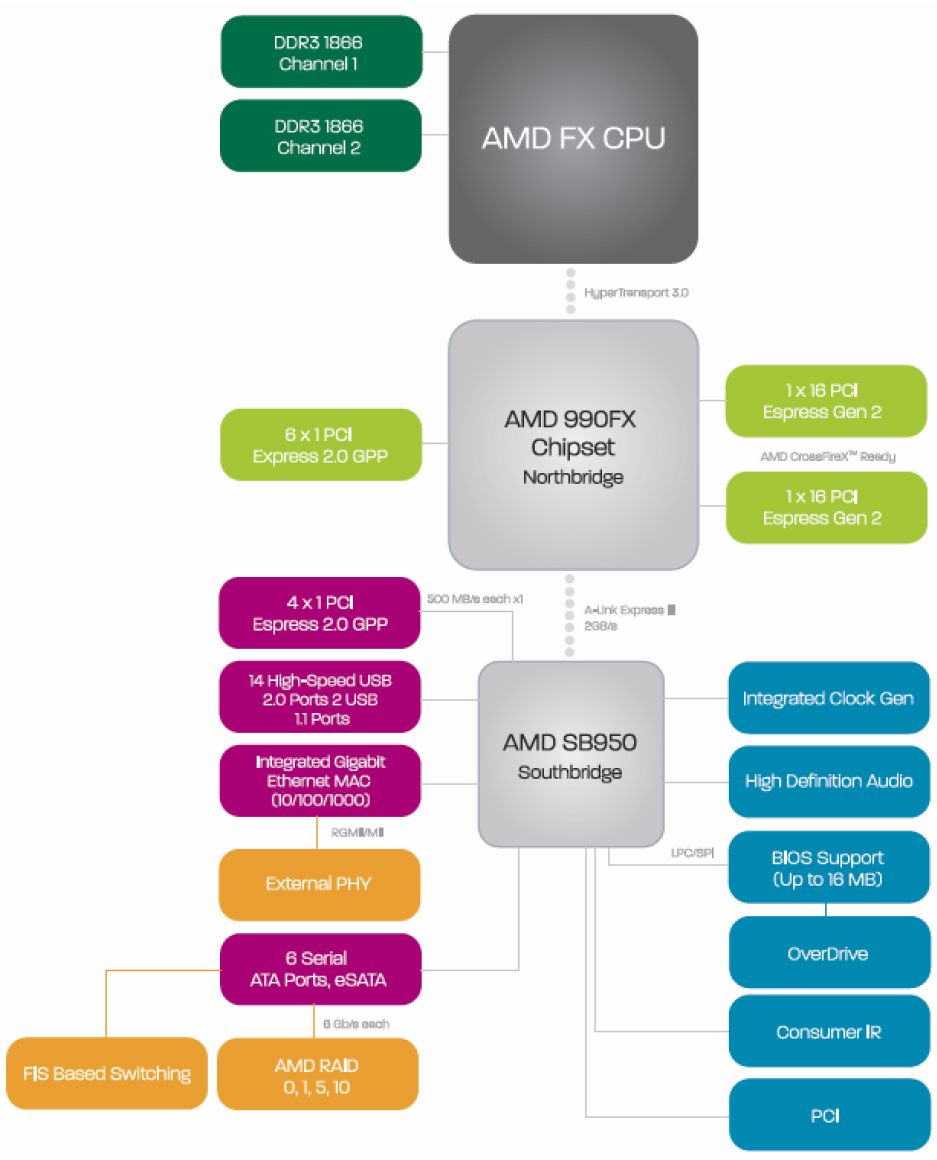 Source: Bjorn3D.
This section will provide an AMD 9-series chipset comparison, hopefully helping to provide a bit more meaning behind those numbers; we'll look at the differences between AMD's 990FX, 990X, and 970 chipsets.
AMD's inter-platform limitations are slightly less convoluted than Intel's, but not all that different. Between the different chipset options, the most common differences are PCI-e slot availability and lanes, TDP, and South Bridge options.
AMD Chipset Lettering/Numbering Naming Scheme Explanation
Again, AMD tends to be a bit easier to understand than Intel's naming conventions. AMD has four primary lines of chipsets: Enthusiast (FX), Performance (X), Mainstream (non-lettered), and APU (G). The targeted market for the chipset is marked by its suffix, the generation by its numerical prefix. FX chips are targeted toward enthusiasts (maximum CrossFire/SLI capabilities), X-series chipsets are capable of up to two GPUs, but are otherwise considered 'Performance,' G-series chipsets offer powerful on-chip graphics (APUs), and non-lettered chipsets (970, in this case) are for the budget and mainstream markets.
AMD Chipset Differences & Comparison - 990FX, 990X, 980G, 970
Back to the tangible differences. AMD's chipsets are mostly uninteresting, with differences hinging primarily upon physical options on the motherboard. Here's another table, to make things a bit easier:
| AMD 990FX | AMD 990X | AMD 970 | |
| PCI-e Support | 1x16 2x16 4x8 | 1x16 2x8 | 1x16 |
| TDP | 19.6W | 14W | 13.6W |
| SB | SB950 | SB950 | SB950/SB920 |
990FX: AMD's enthusiast line is, as displayed in the table, primarily advantageous for its added PCI-e lanes and bulked-up multi-GPU support, allowing up to four GPUs (x16/x16, x8/x8/x8/x8). Additionally, the 990FX's TDP is calculated at 19.6W, certainly making it undesirable for low-spec systems, like HTPCs. The 990FX uses the SB950 southbridge and has a total of 42PCI-e 2.x lanes.
990X: In the performance section, which is probably what most of our regular system builders should consider, the 990X is equipped to handle x8/x8 graphics arrays, operates at 14W TDP. The 990X also uses the SB950 southbridge and has a total of 26PCI-e 2.x lanes.
970: This is certainly the 'mainstream' chip. With no support for Crossfire/SLI and only 26PCI-e 2.x lanes, the 970 is best-known for its low-TDP (13.6W) and cheap buying options. The 970 uses SB950 and SB920.
"What Chipset is Best for Me?"
First, I'll note that our hardware forums are an excellent resource for advice from our system build team, but if you're looking to analyze build choices on your own, continue on.
After looking over all the above feature-sets, it should be fairly obvious which chipset is correct for your impending build(s). There are three primary reasons you'd need an upper-range chipset: A high-end build, for fun/enthusiast purposes, or because you plan to make substantial upgrades as your system ages. For the most part, unless complex GPU arrays and Intel's SRT are a concern, the Z75 or 990X will cover just about any mid-upper range configuration. The H77 and 970 are restrictive in their possibilities for future upgrades (and the H77 has zero CPU/RAM overclocking support, so you're stuck with what you get), but are still excellent chips for entry-level and budget-friendly assemblies. You don't need a Z77 or 990FX, just as you don't need the most expensive transportation option. If the system just needs to perform one task, like gaming, and perform it very affordably, GPU and CPU choice will more directly impact performance than chipset choice; however, again, I'll emphasize that limiting your motherboard could severely hamper future upgrade-ability.
When spec-ing out a budget build, it becomes a game of "Do I want power now, or power later?" Choosing high-end core components (CPU, motherboard) now will improve overall longevity of the system, but you may suffer now by dedicating more funds for the motherboard/CPU and thus will end up with a cheaper GPU. Now, when I say "improve overall longevity," we aren't talking years upon years: An excellent motherboard will allow overclocking when the system ages (see our previously-linked Overclocking Primer), hopefully pushing the CPU back up to a usable level, but nothing can prevent the inevitable obsolescence of hardware. Gaming tends to exhibit larger improvements from GPU upgrades than anything else, rightfully so. As we mentioned in our bottleneck testing guide, games still run optimally on one to two threads (some use four), meaning that expensive CPUs may not have as immediate an impact as equally-priced GPUs. You should never skimp on the CPU, of course, but it's not necessary to have a 3570k, either.
In general, it boils down to how interested you are in those extra features. Never planning to use SSD caching or 3-way SLI? You don't need the Z77. Though it's nice to have the extra options, should things change.
If you require further assistance on this topic, don't hesitate to ask below or post on our forums!
- Steve "Lelldorianx" Burke.
Update: We replaced the AMD graphic with one more accurate, per Danni's comment suggestion. The previous graphic unfortunately contained a few mistakes that we did not catch in the editorial process (we were led to believe it was created by AMD, but it was in fact created by a 3rd party without accurate information).