After our Antec GX700 review and H630 review, we figured it was time to look at something a little more mid-range for the system building market. NZXT's Phantom 530 came out a little while ago (and is included in our impending "how to build a PC" video tutorial), but we haven't had time to properly benchmark the thermals until recently. The Phantom 530 aims to fit between NZXT's Source line and larger Phantom offerings (like the P630), landing it at $130, but still packing extra features.
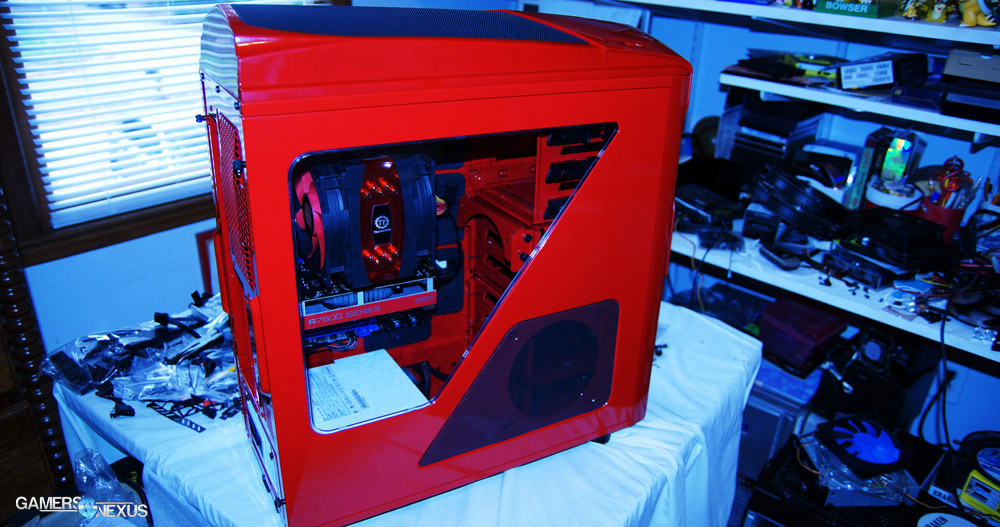
In this NZXT Phantom 530 review, benchmark, & cable management guide, we'll look over the case's build quality and thermal performance. Given our previous history with Phantom cases, things certainly seem promising. Let's start with the specs.
NZXT Phantom 530 Case Specs
| Size | Full Tower |
| Model Number | CA-PH530-W1 White CA-PH530-B1 Black CA-PH530-R1 Red |
| Drive Bays | External 5.25" x 3 Internal 3.5" /2.5": 6 Internal 2.5": 1 + 6 |
| Cooling System | Front 2x140mm/ 120mm or 1x200mm (1 x 200mm included) Rear 1x140mm (included) / 120mm Bottom 2x120mm Side 1x140mm Top 2x200mm/ 140mm or 3x120mm Interior 1x120mm/140mm |
| Clearance | CPU Cooler 183mm VGA Card 282mm (With Cage & Pivot Fan), 310mm (With Cage), 444mm (Without Cage) Cable Management 26mm (Lowest Point)/ 34mm (Highest Point) |
| Dimensions | 235mm x 572mm x 543mm |
| Material | Steel, Plastic |
| Motherboard Support | ITX, Micro-ATX, ATX, EATX (322x272mm) |
| Expansion Slots | 8 |
| External Electronics | 1 x Audio / Mic 2 x USB 3.0 |
| Product Weight | 10.5 kg |
| UPC | 815671011572 (White) 815671011589 (Black) 815671011640 (Red) |
| EAN | 5060301690824 (White) 5060301690831 (Black) 5060301690893 (Red) |
| Warranty | 2 Years |
NZXT Phantom 530 Video Review, Hands-On, Benchmark, & Cable Management
NZXT Phantom 530 Features & Specs Analysis
If you're already familiar with the Phantom 630, then you're pretty familiar with the 530 by default. It's a bit smaller and less flashy, but has largely identical build quality and features. For this reason, this review will be a bit shorter than our previous NZXT case reviews -- the chassis has been repeated for several generations now, so check out the Phantom 630, H630, and Phantom 820 reviews (slightly different chassis on this one) for info on that.
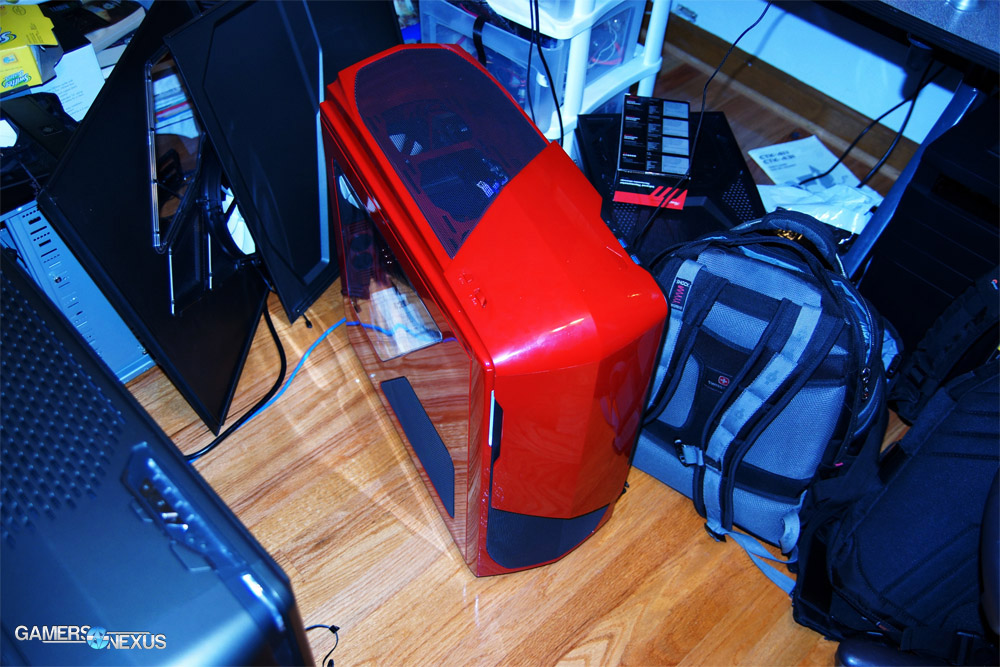
Features-wise, the Phantom 530 offers about what you'd expect in a $130 case. It's fitted with 1x140mm + 1x200mm fans, basic dust filtration, cable management features, a simple fan controller, and some stylized paneling. As for improvements over the previous iteration of this Phantom, NZXT has added 70% more cable management space, making our lives much easier when sealing the case post-build.
As with all their recent frames, NZXT's modular drive cages line the front scaffolding, so unused cages can be easily removed for improved airflow from front intake. The simple dual-fan design is in a standard push/pull (front/rear) config, like the previous iterations on the chassis, additional internal fans can be mounted to the drive scaffolding and top, side, and bottom of the case. A rear fan hub is mounted to the back-side of the board tray, serving as a central location for fan connections; the fans can be controlled via a 3-speed fan controller (high / medium / low) to help mitigate noise levels. Found next to the rear fan hub is an SSD sled, for a more discrete mounting location away from the larger bays.
NZXT Phantom 530 Build Quality, Cable Management, & System Installation
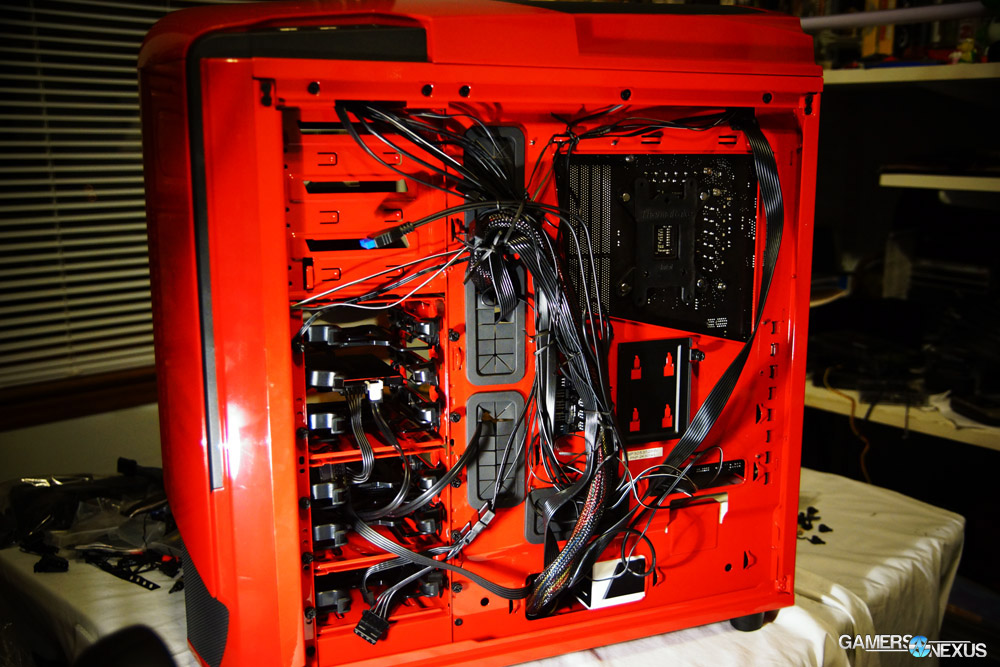
Again, build quality is about what we'd expect. I should note that on the red case we reviewed, the paint almost made the plastic top and front panels look like "cheap plastic" -- the kind you'd find in a toy for a child. Personally, I'd never want that for my build, but the black and white versions both look just fine.
The metals and plastics are reasonable quality, despite how the paint works, and will hold up will through multiple build cycles. The Phantom 530 doesn't use the level of materials you might see in a $180+ case, but for its price, all seems fair; it's not cheap and will endure movement and rebuilds for many years, but it's not enterprise-class metal, like the 900D would have.
Perhaps an advantage over the other Phantom cases, the new P530 has a significant amount of space dedicated toward top-mounted radiators in a dedicated compartment. A fat radiator will easily fit in the 'overhead compartment' of the 530, and in terms of length, up to 360mm radiators will natively mount. You won't be able to mount a push-pull configuration without installing the radiator below the mounting bar, but the extra room does help accommodate for fat radiators in push configurations (see: H80, stock AMD CLC).
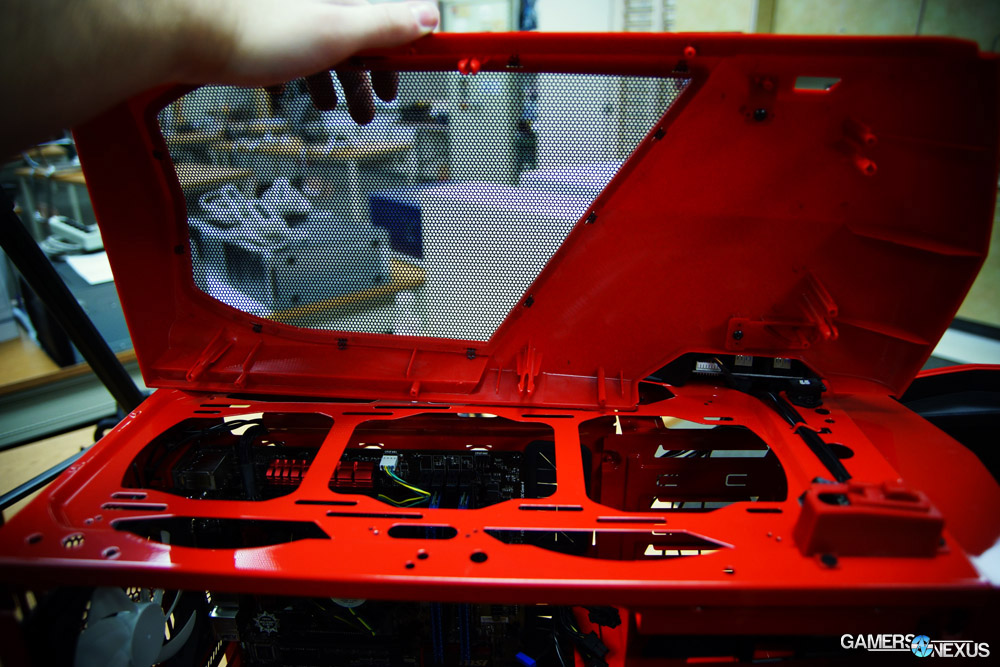
Cable management is also pretty straight-forward: As with all Phantom-class chassis of this generation, you basically just run the cables through the cut-outs, tie them to the anchor points on the rear side of the board, and you're done. Nothing fancy involved here. The case will close easily, even with multiple cables stacked atop each other, and doesn't need much forethought to cable organization (though we recommend it). Try to utilize the deepened channels in the rear side of the board tray to keep the 24-pin and PCI-e power cables less prohibitive when closing the case.
System installation is pretty straight-forward. There's really nothing all that special or anything negative about system installation here.
Continue to page 2 for the benchmark results.
Test Methodology
We have a brand new test bench that we assembled for the 2013-2014 period! Having moved away from our trusty i7-930 and GTX 580, the new bench includes the below components:
| GN Test Bench 2013 | Name | Courtesy Of | Cost |
| Video Card | XFX Ghost 7850 | GamersNexus | ~$160 |
| CPU | Intel i5-3570k CPU | GamersNexus | ~$220 |
| Memory | 16GB Kingston HyperX Genesis 10th Anniv. @ 2400MHz | Kingston Tech. | ~$117 |
| Motherboard | MSI Z77A-GD65 OC Board | GamersNexus | ~$160 |
| Power Supply | NZXT HALE90 V2 | NZXT | Pending |
| SSD | Kingston 240GB HyperX 3K SSD | Kingston Tech. | ~$205 |
| Optical Drive | ASUS Optical Drive | GamersNexus | ~$20 |
| Case | (This is what we're testing) Phantom 530 | NZXT | ~$130 |
| CPU Cooler | Thermaltake Frio Advanced Cooler | Thermaltake | ~$60 |
All of our testing is conducted in a temperature-controlled environment. Ambient is between 21C and 22C for all case airflow tests. The graphs measure temperature in Delta T over Ambient (C) - so the ambient temperature is subtracted from the component temperature.
Each test is initiated with a cold boot, where the system will sit idle for 15 minutes and collect thermal data. We use CPUID's HWMonitorPro for thermal logging and tracking. After this idle time, the system will launch a Prime95 instance running four torture threads on Large FFTs for maximum heat generation and power utilization. This is run for 15 minutes, throughout which the logging utility will collect the data we used in the below charts. Another 15 minute cool-down time (idle) is allowed after the Prime95 instance is completed, at which time an instance of FurMark launches and tortures the GPU with its 15-minute burn-in test (1080p). A final round of idle time is allowed to ensure data consistency.
All CPU thermal results are computed using Core 1 (not Core 0) due to its higher thermal reliability on our IB chip.
NZXT Phantom 530 Benchmark vs. Phantom 630, Armor Evolution, Thor V2 , etc.
We kept the benchmarks pretty simple on this one, since I suspect the deltas between additional fans will be largely identical (read: identical) to the Phantom 630 and very similar to the H630. For this reason, the tests were run strictly in the stock configuration with high/medium/low fan control settings. Here's the CPU chart:
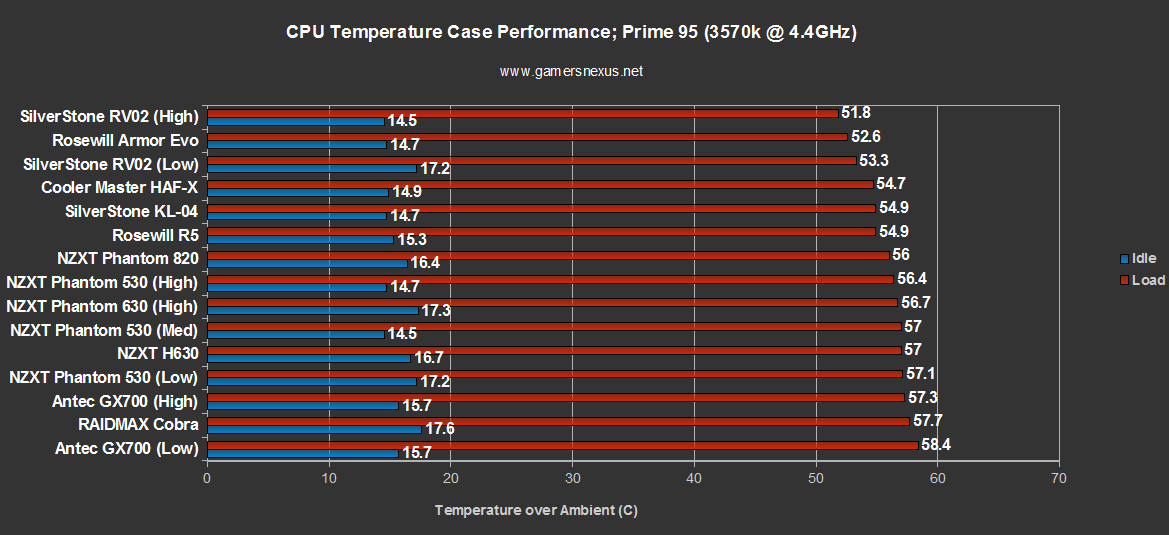
Like everything else with this case, the results are what we'd expect. Nothing that floors me, but not bad, either. The 530, 630, and 820 placed about the same in testing (within margin of error), with the 530's overall CPU performance placing center of the pack. I'd probably recommend purchasing an additional top-mounted fan to assist in cooling; mount it as an exhaust fan toward the back of the case so it doesn't steal air from the CPU cooler.
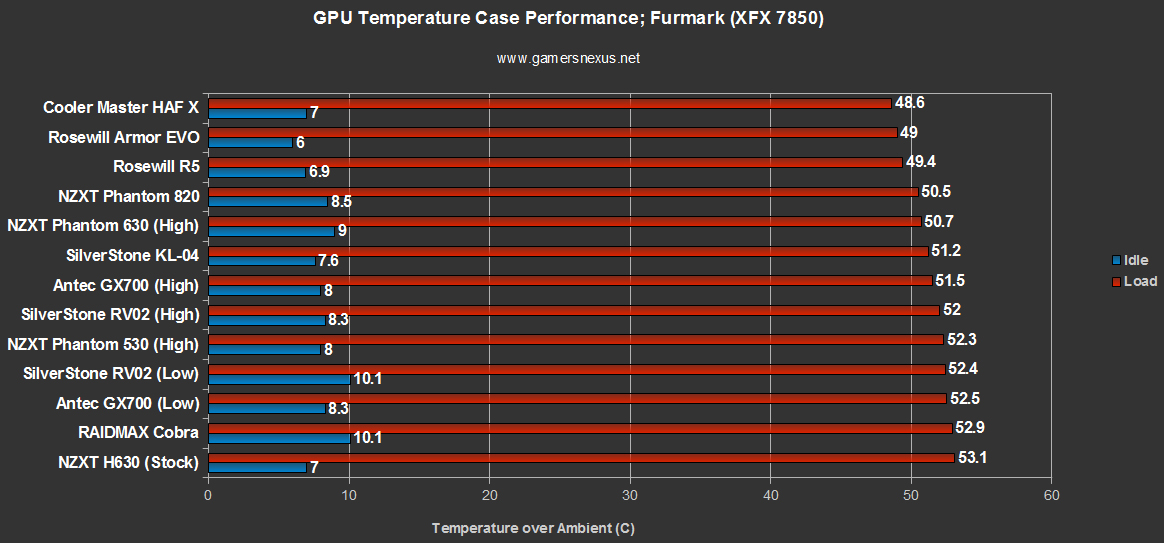
GPU results were similarly center-pack. I suspect a larger video adapter (like a 770 or 7970) would benefit greatly from an added side intake fan and/or added hinge fan on the drive scaffolding.
Conclusion: The Phantom 530 is a Solid Mid-Range Case
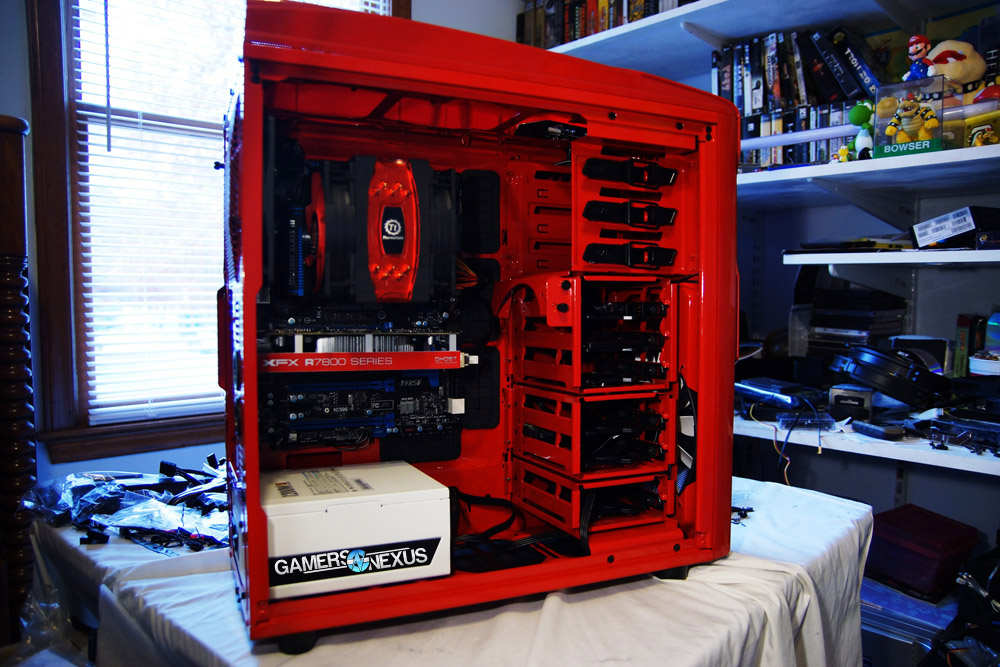
There's really not much I can complain about with the Phantom 530. The 'cheap plastic' look that is created from the glossy red paint is pretty dislikable, I guess, but that's easily worked-around by simply purchasing a more standard black or white case instead. Beyond that, I really didn't hit anything that frustrated me.
At $130, the case competes most directly with Rosewill's (aging) Thor V2, which is a bit larger and (in my opinion) a preferable case for its fan configuration and aesthetic. Other than that, Corsair's C70 is another solid option in the same price range; the C70 uses higher-quality metals and ditches much of the "plastic robot" design, using Corsair's words, so might be favorable to those who really don't care for flair.
The Phantom 530 is worth picking up if you like its appearance, and that's really all it comes down to -- the C70, Thor V2, and P530 are all excellent choices in the price-range, so it'll largely boil down to looks. The Phantom 530 does have better radiator support, though, so if large cooling radiators / CLCs are of interest, the 530 wins.
- Steve "Lelldorianx" Burke.